The overlay that QuickPose draws on top of the camera — the points, the lines, the range-of-motion arcs — is the part of your app your users actually *see*. Until now it looked the same in every app: crisp white lines on a live feed. Functional, but generic.
Not anymore. The latest QuickPose SDK ships a full styling layer that lets you make the skeleton feel like it belongs in your app, not ours. Same on-device pose estimation, same two-hour integration — now with the visual polish to match your brand.
A few new tricks worth showing off
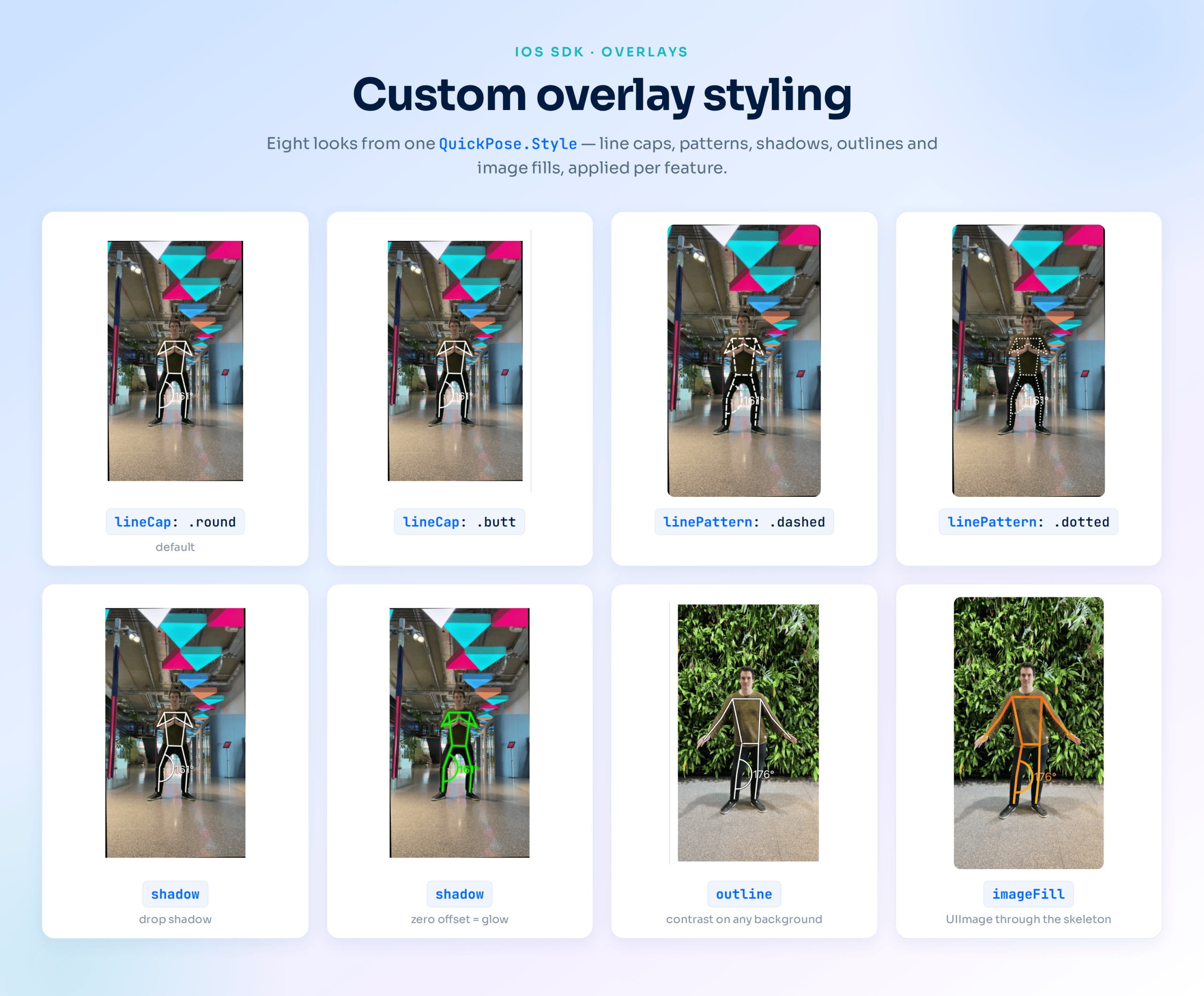
Shadows and glows. Add a soft drop shadow so lines read cleanly against a busy background, or drop the offset to zero and turn that same shadow into a neon glow. Great for a high-energy fitness look.
Outlines. A contrasting border sits behind your lines and points, keeping the skeleton visible whether your user is filming against a white wall or a dark gym floor.
Image fills. This one’s our favorite. The skeleton becomes a mask that reveals an image scaled to fill the camera frame — so instead of plain lines, the body is painted with a gradient, a texture, or your own artwork.
Conditional colours. Style reacts to the movement. Turn a joint angle green when your user hits perfect form and red when they don’t — no extra logic in your view layer, just a range and a color.
The finer details. Dashed and dotted line patterns, round or square line caps, custom typefaces and letter spacing for labels, adjustable line thickness, arc size, and font size. Small controls that add up to a distinct, considered look.
Styling is just a parameter
There’s no new pipeline to learn. Every annotation you already use takes an optional style, so you opt in exactly where you want it:
					// Swift example
// Points and overlays now accept a custom style
.showPoints(style: myStyle)
.overlay(feature: .wholeBody, style: myStyle)
Set a color, add a shadow, hand it a conditional color, and you’re done. Everything else about your integration stays exactly the same.
On-device, as always
None of this changes what makes QuickPose QuickPose. All processing still happens on the device — no video leaves the app, no network round-trips, no latency. You’re just getting more control over the pixels your users see.
Availability
The advanced styling features — line caps, line patterns, shadows, outlines, image fills, custom fonts, and letter spacing — are available now in the iOS, Android and React Native SDKs. Core color and sizing controls work across earlier versions too.
Full property reference and code samples live in the [Annotations & Styling docs]. Update your SDK, pass in a style, and give your skeleton some personality.