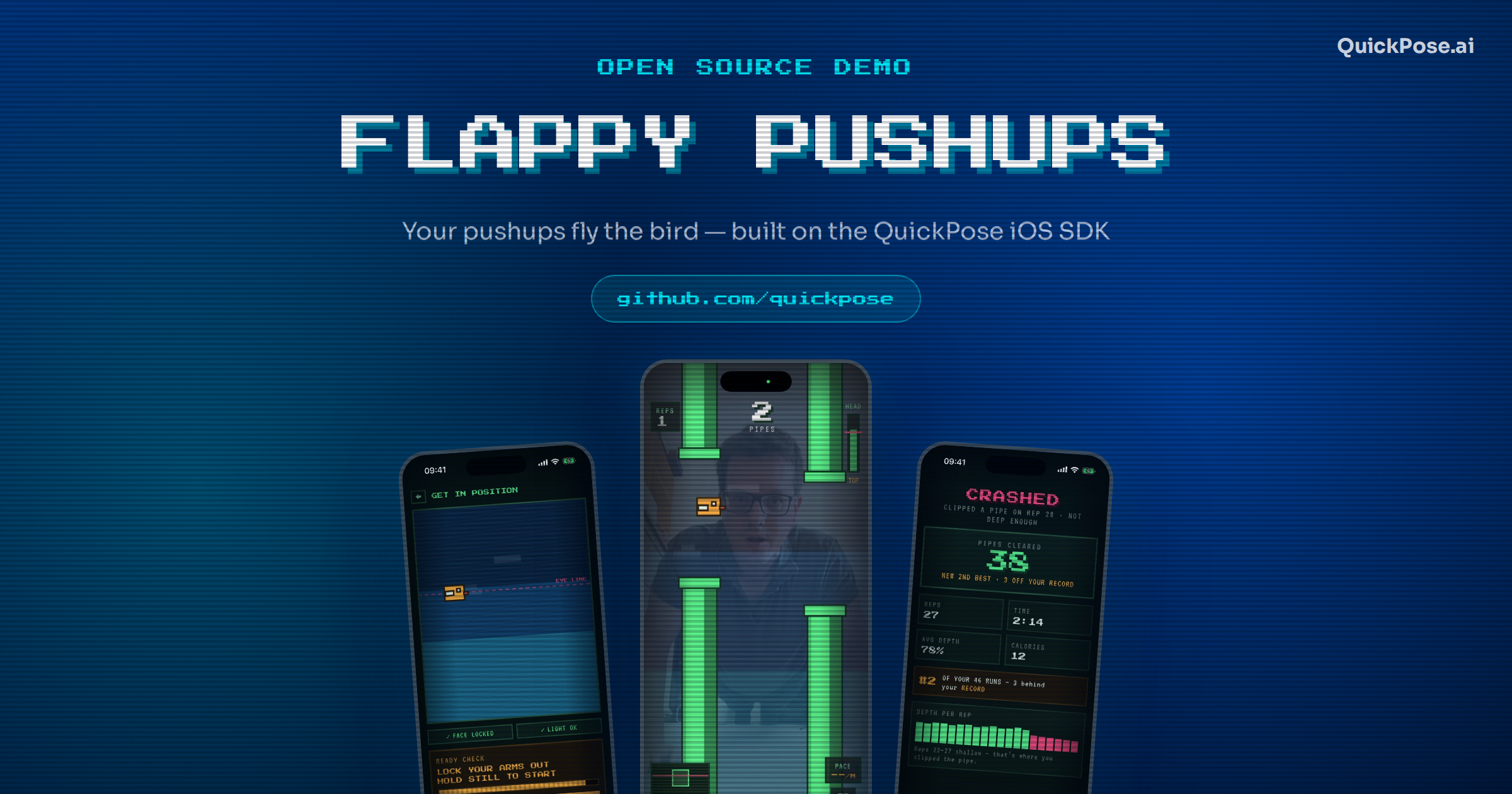
Prop your phone on the floor, get into a plank, and the bird sits on your eye line. Sink down and it dives; push up and it climbs through the pipes. Flappy Pushups is an open-source iOS demo built on the QuickPose SDK — a small, complete app that shows what on-device pose estimation looks like when it drives something in real time rather than counting in the background.
The whole thing is on GitHub and runs on a free SDK key. Here's how it works, and what's worth stealing from it.
The trick: no calibration, just your eyes
Most camera-driven fitness games start with a setup dance — stand here, hold still, raise your arms. Flappy Pushups skips it. QuickPose's light pose model reads the left and right .eye landmarks from the front camera, and the app publishes their midpoint as the bird's position:
Because the landmark is mapped into the same mirrored, aspect-fill space as the camera preview, the bird lands exactly where your eyes are on screen. That single decision removes the calibration step and makes the control feel immediate — you are not moving a cursor, you are the cursor.
The game learns your pushup
The second idea is the one that makes it playable for a beginner and a gym regular alike. GameEngine takes your eye position at the end of the 3-2-1 countdown as the top of the pushup — arms locked out — then tracks how deep you actually go during the run and places the pipe openings inside that range. Openings alternate high and low, so roughly every pair of pipes is one rep. The deepest range carries over to your next run.
Rep counting comes off the same signal: RepCounter converts head height into reps with hysteresis between a "top" and a "deep" threshold, which is what stops a shaky hover at mid-height from racking up phantom reps. Push up too early and you get a GO LOWER! warning, and a depth-per-rep chart at the end of the run.
Worth borrowing: adaptive difficulty from the user's own measured range beats a fixed difficulty curve for any movement app. You get an easy mode and a hard mode for free, and neither needs a settings screen.
What's in the box
Eye-line control
Both eyes tracked on the front camera, no calibration step, tracking loss pauses the game until it finds you again.
Adaptive pipes
Opening size and placement generated from your learned head range.
Reps and form feedback
Live pace readout, depth warnings, depth-per-rep chart after every run.
Retro CRT look
Pixel fonts, scanlines and a see-through sky over the live camera feed.
Progress tracking
Daily streak, reps per day, best runs and an average-depth trend, stored locally with SwiftData.
Flock leaderboard
Friends' best runs through Game Center, falling back to your own bests when signed out.
Running it yourself
You need Xcode 26 or later and an iPhone on iOS 26.5 or later — the game wants the front camera, though in the simulator you can drag the bird around to see the screens.
- Clone the repo and open
Flappy Pushups.xcodeproj. Xcode resolves thequickpose-ios-sdkSwift package for you. - Under Signing & Capabilities, pick your team and set your own bundle identifier.
- Register at dev.quickpose.ai for a free SDK key tied to that bundle identifier, and paste it into
Config.swift:
static let quickPoseSDKKey = "YOUR_QUICKPOSE_SDK_KEY"
Flappy Pushups/Config.swift
Build, run, and prop the phone up. The Flock leaderboard is optional: it uses a Game Center leaderboard with the ID flappypushups.best_pipes set to "High score is best" — create it in App Store Connect, change Config.leaderboardID, or skip it and the tab shows your own best runs.
Debug shortcuts
Reviewing the UI without doing fifty pushups is a real problem when you build something like this, so Debug builds take launch arguments: -startScreen home|setup|game|results|progress|flock opens straight to a screen, -seedRuns fills the history with four weeks of sample runs, and -autopilot flies the bird through every opening on its own.
Where the code lives
It's a small enough project to read in an afternoon. The four files that matter:
HeadTracker.swift— QuickPose and camera lifecycle, eye landmarks, screen-space mapping, lighting check.GameEngine.swift— game loop, learned head range, pipe generation, collisions, rep counting.WorldPainter.swift— the pixel-art drawing: sky, pipes, ground, bird, and the camera backdrop.RunRecord.swift— the SwiftData model and run statistics.
Ideas we haven't built yet
It's a demo, so the roadmap in the README is deliberately open — pull requests welcome. Most of it hooks into GameEngine's speed, gapHeight and spawnPipe, or reuses features already in the SDK:
- Other exercises. Drive the bird with hip or shoulder height instead — squats, sit-ups and jumping jacks already ship as fitness features (
.fitness(.squats)and friends). - Real form scoring.
.rangeOfMotion(.elbow(side:clockwiseDirection:))would confirm actual depth rather than inferring it from head travel, and could flag sagging hips. - Modes. Easy/medium/hard presets, a plank-hold mode, a workout mode that targets a rep count instead of an endless run, knee pushups for beginners, a seeded daily challenge.
- Social. Ghost races against a friend's recorded run, shareable clips of a run with the overlay, weekly flock challenges.
Privacy: camera frames are processed on device by QuickPose. No images or video leave the phone, and run history stays local.
Clone it and do some pushups
Free SDK key, one config line, and you're playing. If you build one of the roadmap ideas, send a pull request.