Since the styling release in July we've shipped five updates to the iOS SDK — five new fitness exercises, a wider default camera field of view, a fix that makes front push-ups countable head-on, finer control over the skeleton overlay, and a change to the MediaPipe graph that keeps the pipeline busy between frames. Here's everything in v1.4.0 through v1.7.0, and what to check when you upgrade.
Five new exercises: burpees, shoulder taps, mountain climbers, high knee taps and boxing
The biggest addition of the cycle. Five new cases on QuickPose.FitnessFeature, each with its own rep logic rather than a generic movement threshold:
.burpees— the full stand → squat → floor → stand sequence. A squat without the floor stage does not count..shoulderTaps— high plank, hand to opposite shoulder; each tap counts..mountainClimbers— high plank, alternate knee drives; each drive counts..highKneeTaps— standing alternate knee raises; each raise counts..boxing— guard ↔ jab/cross; each punch counts.
They drop into an existing integration the same way as squats or planks — one feature, one line:
quickPose.start(features: [.fitness(.burpees)], onFrame: { status, image, features, feedback, landmarks in
    if case .success = status {
        overlayImage = image
    }
})
The same release also tightened up session hygiene. Exercise state now fully resets on start() and when an exercise is newly added through update(features:), so a previous session can no longer bleed into the next rep count. And stop() now halts frame processing immediately, instead of letting one queued frame slip through after teardown.
QuickPoseCamera defaults to the widest field of view
QuickPoseCamera now selects the widest field of view the chosen camera offers — typically the sensor-native 4:3 format (e.g. 1440×1080) instead of a 16:9 centre crop. In practice that means noticeably more of the scene in frame: on the front camera it matches the "zoomed out" selfie framing of the stock Camera app, which is the difference between a user having to back away from the phone to fit a burpee in shot and simply not having to.
Heads-up: the capture aspect ratio changes from 16:9 to 4:3. If your UI assumes a 16:9 preview — fixed frames, aspect-ratio constraints, overlays positioned against a hard-coded ratio — check those layouts before shipping.
Front push-ups now count head-on
.fitness(.frontPushUps) counted nothing when filmed from the front, which is exactly how people prop a phone up to record push-ups. Two things were wrong. The posture gate tested for a side-on horizontal torso, so it returned 0 for every front-facing frame; and a full elbow bend never projected down to the 90° bottom angle, which stalled legitimate reps below the counting threshold.
The gate now tests directly for an upright body, and the bottom angle accounts for head-on foreshortening. The display title typo went with it.
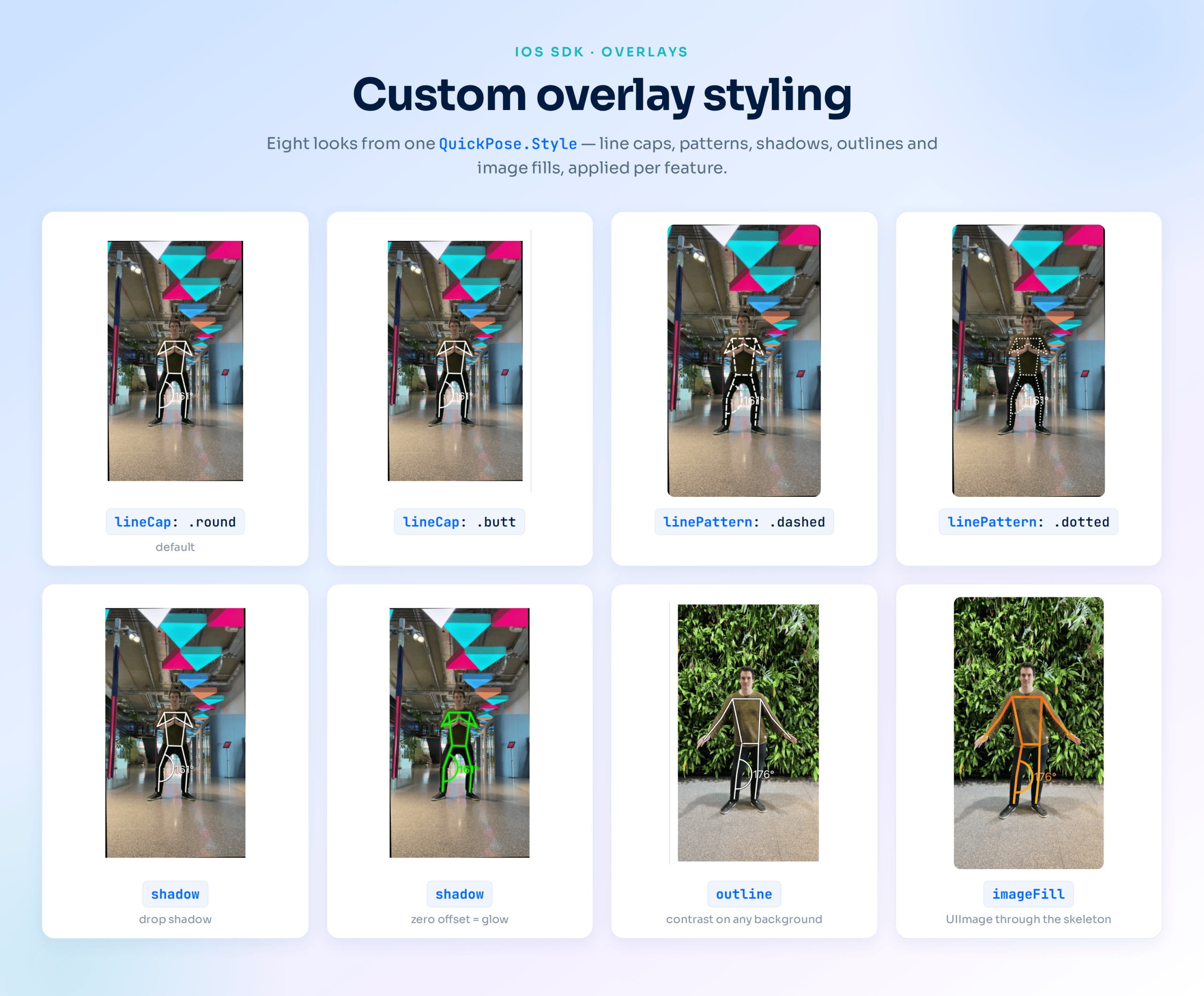
Scale the landmark dots with Style.relativePointSize
July's styling release let you restyle lines, labels and arcs, but the landmark dots drawn by the .showPoints feature stayed a fixed size. relativePointSize closes that gap — a value of 0.3 renders points at 30% of the default, which is usually what you want when you're checking landmark quality over a live preview rather than dominating it:
let subtle = QuickPose.Style(relativePointSize: 0.3)
let feature: QuickPose.Feature = .showPoints(style: subtle)
Frame pipelining in the MediaPipe graph
The bundled MediaPipe graph now holds the next camera frame ready while inference runs on the current one, rather than sitting idle until the next camera callback arrives. It's the FlowLimiter max_in_queue: 1 setting from upstream's live-camera configuration.
Two things worth saying plainly about this one. Landmark output is byte-identical — nothing about the model, its accuracy or its results changes. And frames in flight stay capped at two, so this buys throughput without letting a backlog build up and push the overlay out of sync with the camera. No API change, no migration: update and it's there.
Getting to v1.7.0
In Xcode, File → Packages → Update to Latest Package Versions, or pin the version in your package manifest:
.package(url: "https://github.com/quickpose/quickpose-ios-sdk.git", from: "1.7.0")
On CocoaPods, pod update QuickPoseCore QuickPoseCamera QuickPoseSwiftUI. Coming from v1.3.x or earlier, two changes are worth a look before you ship:
- The camera's capture aspect ratio is now 4:3 rather than 16:9 (v1.5.0) — verify any layout that assumed the old ratio.
- Overlay lines use round caps and joins by default since v1.3.0. Set
lineCap: .buttto restore the previous appearance.
Start building
QuickPose runs entirely on-device — no video leaves the phone. Register for a free SDK key, add the package, and you're counting reps in an afternoon.